
Turn Google Search Console SEO Data into Actionable insights.
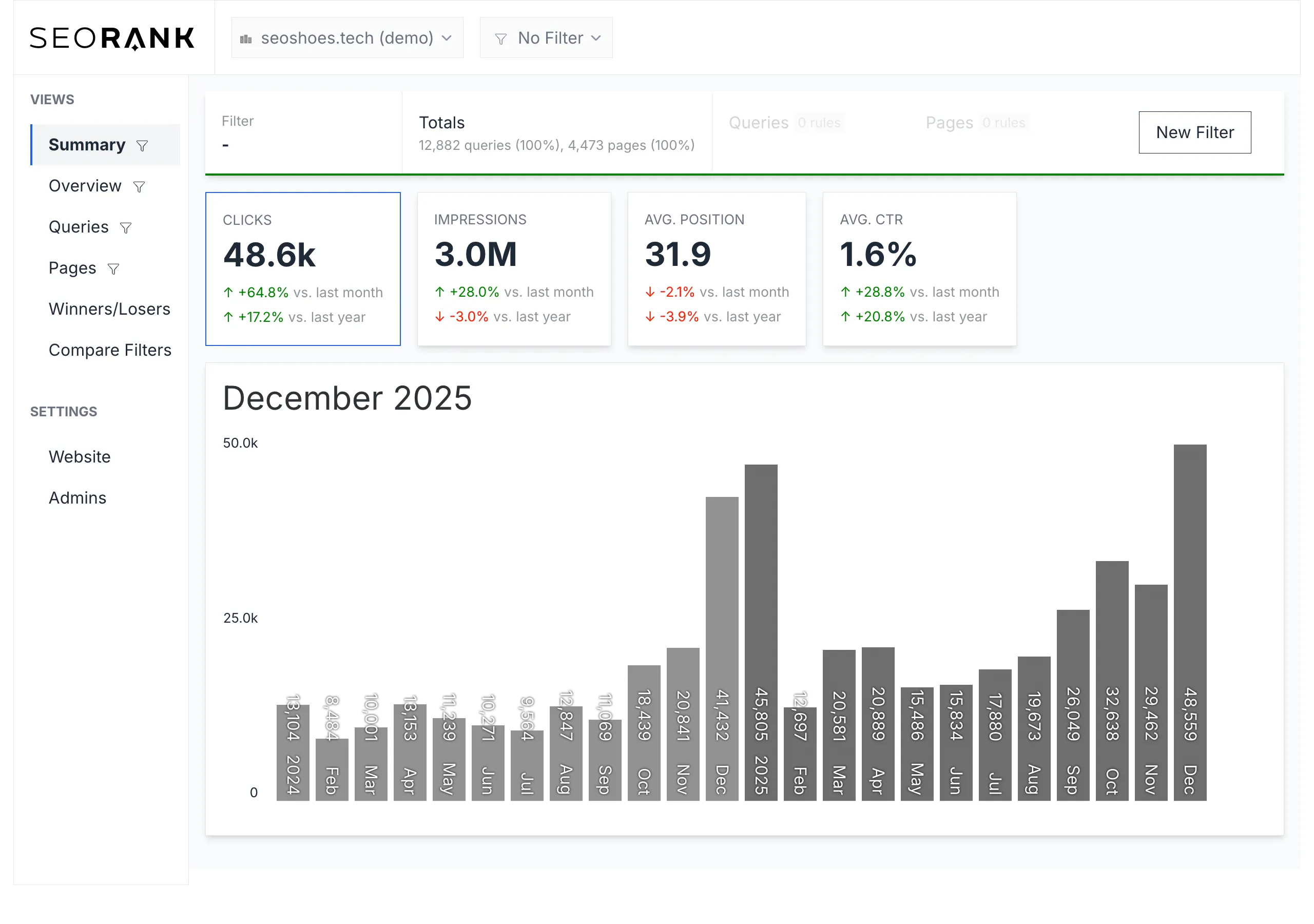
Stop drowning in raw SEO data. SEORank helps you organizes your GSC metrics. Instead of tracking single keywords, you can slice your data by important queries, e.g. Product, Brands or Services with Filters.
This aggregation helps you to better track changes and focus on important parts of your business.


Connect Your Google Search Console (GSC) Account
Link your Google Search Console (GSC) and let SEORank handle the rest automatically.

Turn Raw GSC SEO Data into Real Insights
We structure, aggregate, and visualize your Search Console SEO data — with built-in month-over-month views and no manual comparisons required.

Turn Insights into Growth
See exactly where to optimize — whether it’s boosting winners, fixing declining pages, or improving CTR where rankings are already strong.

Set Topic and URL-Clusters for Further analysis
Split up your SEO data on queries or URLs that matter , Content Groups or Branded versus Non-Branded Search Queries
- Language Folders
- Topic Groups
- Branded versus Non-Branded Queries
to understand, how different clusters perform over time.
Insights from Your GSC — Simplified and Amplified

Topic-Based Segmentation
Slice GSC data by your specific topics and clusters.

Gains & Losses Tracking
Spot your biggest SEO winners and losers at a glance.

Branded vs. Non-Branded Split
Automatically separate your brand equity from your organic growth).

Multi-Domain Support
Manage and analyze multiple domains in one dashboard.

GSC Synchronization
Automatic synchronization with your Google Search Console data.

Content & Topic Clusters
Segment and analyze your data by filters for queries and URLs.

Export Functions
Export your data in various formats (CSV, PDF, Excel).

Historical Data
Access historical data and compare different time periods.
How to analyze SEO data in 4 steps
Understanding SEO performance in modern search requires more than tracking rankings. By analyzing your Google Search Console data step by step, you can uncover visibility trends, identify growth opportunities, and detect how your content performs in AI-driven search results.
Step 1
Identify impression-heavy queries
Start by looking for search queries that generate high impressions but relatively few clicks. These queries indicate topics where Google already shows your content frequently, but where your pages may not yet attract enough user attention.
Improving the page’s relevance for these queries - for example by strengthening topical depth, clarifying entities, and aligning the content more closely with user intent - can often unlock significant SEO gains. Enhancing E-E-A-T signals, such as demonstrating expertise, adding supporting data, and clearly answering the search intent, further increases the likelihood that your content gains visibility in both traditional search results and AI-driven features.
Step 2
Define your priority search queries
Not every query deserves equal attention. Identify the search queries that matter most for your business by considering factors such as search intent, relevance to your product or service, and potential traffic impact.
Once defined, these priority queries can be added as filters in SEORank, allowing you to group them and monitor their aggregated performance over time. This makes it easier to track how your most important topics evolve on a monthly level, rather than analyzing individual queries one by one.
Step 3
Separate branded vs non-branded queries
To understand real SEO growth, it is important to separate branded searches (e.g., searches containing your brand name) from non-branded searches.
Filtering branded queries allows you to focus on the queries where users discover your website through generic search terms rather than brand awareness.
Step 4
Identify winners and losers
Compare different time periods in Google Search Console to identify queries and pages that gained or lost visibility.
This analysis helps reveal:
- pages that improved rankings
- pages that lost impressions or clicks
- new queries where your content started to appear
Understanding these shifts allows you to react quickly and refine your SEO strategy.
Step 5
Uncover AI Overview prompts and impressions
Longer search queries increasingly resemble prompts that users enter into AI-powered search systems.
By filtering queries with five or more words, you can surface prompt-like searches that often trigger features such as Google’s AI Overview.
Analyzing these queries can provide early insights into how your content appears in AI-driven search experiences and which topics generate visibility in these new search environments.
FAQs
Have questions about SEORank? Below you’ll find answers to the most common questions about our product, features, data sources, and how SEORank helps you better understand your SEO performance.
What is Google Search Console data?
Google Search Console (GSC) data shows how a website performsin Google search results. It includes impressions, clicks,average position and search queries that triggered your pages.
What is a Google Search Console analytics tool?
A Google Search Console analytics tool helps SEO professionals analyze and interpret the data available in Google Search Console. While Search Console provides raw information such as impressions, clicks, average position, and search queries, analytics tools built on top of this data make it easier to filter, visualize, and identify actionable insights.
These tools typically help users group queries and pages, track performance trends over time, separate branded and non-branded traffic, and detect opportunities for content optimization.
By structuring and analyzing Search Console data more efficiently, a Google Search Console analytics tool allows SEO teams to better understand how their website performs in organic search and where growth opportunities exist.
Why do I need SEORank if I already use Google Search Console?
Google Search Console gives you raw performance data, but it can be hard to interpret and extract insights quickly - even with the recent changes (they introcud weekly and monthly views - YEAHY).
SEORank organizes that data into clear dashboards, comparisons and trend views, shows winners & losers over time, and lets you group related queries or pages to see aggregated performance.
This makes understanding what’s really happening in your SEO much easier, without navigating the non-user friendly Google Search Console page, creating Looker Dashboards or exporting the data to spreadsheets.
What problems does SEORank solve that Search Console doesn’t?
What SEORank does:
- Structures your GSC data with visual charts and clear week-over-week and year-over-year comparisons.
- Lets you filter and compare by query sets or page groups.Separates branded vs non-branded queries so you can measure real SEO impact.
- Highlights top winners and losers in clicks, impressions, CTR and average position.
- Enables side-by-side performance comparison of query groups and page sections.
- These help you understand performance trends rather than just see raw numbers.
- Stores your Search Console data beyond the standard 16-month limit—without requiring a technical BigQuery setup or Google Cloud configuration.
What’s the difference between SEORank and tools like SEMrush, Sistrix or SE Ranking?
Tools like SEMrush, Sistrix or SE Ranking offer a wide range of features (keyword research, competitor analysis, backlink data, paid search metrics, SERP features, etc.). SEORank focuses primarily on turning your own Google Search Console data into clear insights - something most all-in-one tools don’t do as simply.
SEORank doesn’t attempt to be a full suite; it specializes in helping you understand your own SEO performance efficiently and affordably.
Why is SEORank cheaper than most SEO tools? What’s missing?
SEORank is focused on one core source of truth - Google Search Console data - and makes it easier to use and analyze that data. Because it doesn’t include broader features like third-party keyword databases, backlink crawlers, or SERP feature tracking, the pricing is lower. What’s missing are features that many large SEO suites include but you may not use (or pay for) if your primary need is clear Search Console insights.
Can SEORank do keyword research like SEMrush or Sistrix?
Not in the traditional sense. SEORank doesn’t provide a third-party keyword database or suggest new keywords for you to target. Instead, it helps you make sense of the keywords you already rank for in Google Search Console, group them, and track their performance over time. If you need large-scale keyword discovery or competitive keyword gaps, you’ll still need a dedicated keyword research tool.
Does SEORank support GEO (Generative Engine Optimization) or AEO (Answer Engine Optimization)?
SEORank does not directly track AI Overview placements or LLM prompts. We currently rely exclusively on your Google Search Console data.
However, Google Search Console already contains impressions and clicks from search results where websites appear in AI-powered features such as Google’s AI Overview. While these impressions are not labeled separately in GSC, they can still be analyzed indirectly. By filtering search queries with a higher number of words, you can already identify prompt-like searches that users enter into Google today.
This makes it possible to uncover early GEO insights directly from existing Search Console data - without relying on expensive GEO tools.
By structuring, grouping, and comparing your query and page performance over time, SEORank helps you uncover patterns that may be influenced by AI Overview visibility. This makes it easier to detect emerging trends in Google’s evolving search landscape, even without explicit AI Overview labeling.
What is SEORank best suited for - and who is it not for?
SEORank is best suited for:
- SEO practitioners and teams who rely on organic traffic and already use GSC.
- Small and medium businesses that want clear performance insights without complex tools.
- Agencies and consultants that want fast clarity from real client data.Users who find traditional SEO suites overwhelming or expensive.
SEORank is not ideal for:
- Teams that need extensive keyword research databases or third-party ranking data.
- Users who want backlink analysis, backlink monitoring, or paid search insights.
Where does SEORank get its data from?
SEORank uses only your Google Search Console data. Once you connect your GSC account(s), SEORank imports your clicks, impressions, CTR and average position and then presents that data in structured dashboards, grouped views and comparisons.
How often is my Search Console data updated in SEORank?
SEORank refreshes your data monthly - when the full month data is available in Google Search Console. We are working on a feature to make the data accessible on a weekly basis. Daily is not planned.
Do you store my Google Search Console data?
SEORank stores your imported Google Search Console data to power dashboards, comparisons and history tracking. You remain in control: you can disconnect your account and delete your data at any time. Your data is handled securely and in compliance with applicable privacy standards.
Can I test SEORank before committing to a paid plan?
Yes — you can start with a 14 days trial to explore core features and see how SEORank works with your Google Search Console data before choosing a paid plan.
Sign up to our newsletter
Get notified of news and offers and receive early access to beta features.
Ready to get started
Subscribe now and see how SEORank transforms your Google Search Console data into real clarity.